

Accessibility in virtual tours is a subject that’s easy to get wrong. For those commissioning a virtual tour, the options can seem bewildering, and the promise of a quick, automated fix is understandably tempting. This article looks at one of the most common of those fixes, the accessibility overlay or widget, and explains why, despite its apparent appeal, it is rarely the right solution.
Who needs accessibility features?
Accessibility needs are broader than many people assume. Yes, they include users with physical disabilities, visual impairments, or hearing loss. But they also extend to people using older devices, slower internet connections, or assistive technologies they rely on across everything they do online. Designing with accessibility in mind means designing for a much wider audience than the narrow definition suggests.
What is an accessibility overlay or ‘widget’?
An accessibility overlay is an add-on for a website or virtual tour that gives users controls to modify how content is displayed. Typical examples include switching to a static version of the tour, enlarging the cursor, or converting the image to greyscale. They are often marketed as a straightforward route to WCAG compliance, and have frequently been adopted by organisations facing legal pressure over inaccessible digital content.
So why are overlays problematic?
On the surface, an overlay seems like an elegant solution. One addition to a tour, and accessibility is handled. The reality, as research and the wider accessibility community have made increasingly clear, is more complicated. The problems are significant enough that we’d rarely recommend them, and in some cases actively counsel against them.
The evidence against overlays
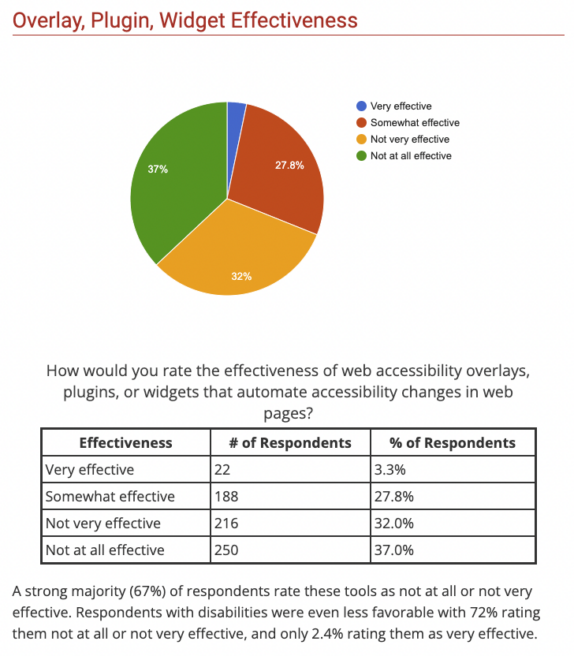
The accessibility community has been consistent on this for some time. Research by WebAIM found that only 2.4% of users with disabilities considered overlays effective, with 72% rating them as not very or not at all effective.
As the Overlay Fact Sheet, a signed statement from over 570 global accessibility experts, notes, the features these widgets offer are largely redundant. Users who need them will already have equivalent tools built into their operating system or installed as dedicated assistive software. The widget doesn’t add capability; at best it duplicates what the user already has, and at worst it gets in the way of it.
“…it is a mistake to believe that the features provided by the overlay widget will be of much use by end users because if those features were necessary to use the website, they’d be needed for all websites that the user interacts with. Instead, the widget is —at best—redundant functionality with what the user already has.”
Overlay Fact Sheet: https://overlayfactsheet.com/en/#strengths-and-weaknesses-of-overlay-widgets
They interfere with the assistive technology users already rely on
Operating systems such as macOS and Windows have sophisticated accessibility features built in, the result of years of research and significant investment. Many users also depend on dedicated assistive technologies such as JAWS, NVDA, or ZoomText, often carefully configured over years to meet their precise needs. When an overlay is added to a virtual tour, it can override or conflict with those personal settings, and may not be compatible with all browsers or assistive technologies. For a user who depends on a screen reader, that interference isn’t an inconvenience. It’s a barrier.
There are technical limitations too
Overlays are not guaranteed to work consistently across all browsers or devices. Some add an additional JavaScript layer that can slow a tour to the point of being unusable, or cause browser instability entirely.
Some overlays also use AI to generate alternative text for images automatically. The intention is sound, but machine-generated image descriptions frequently miss context, misidentify content, or produce descriptions that are technically present but practically useless. For a screen reader user, a bad image description is often worse than no description at all.
The legal risks
Adopting an overlay does not make a virtual tour legally compliant, and in some cases it may actually increase exposure. Accessibility Works has noted that organisations using overlays can become easier targets for legal action, precisely because the overlay signals awareness of an accessibility obligation without meaningfully addressing it. Compliance requires the underlying content to be accessible, not just a tool layered on top of it.1
Compliance without understanding
There is a wider concern in the accessibility community that overlays have become a way for organisations to appear compliant without doing the harder work of understanding what their users actually need. An overlay can be added in an afternoon. Genuinely accessible content cannot. The risk is that the widget becomes a signal of intent rather than evidence of it, and users who rely on assistive technology will notice the difference immediately.
In Conclusion
It’s easy to be dazzled by the panacea that an accessibility widget apparently offers. However, research has brought us to the conclusion that this is almost never the correct way to proceed for an accessible virtual tour.
Where do we go from here for an accessible virtual tour?
Eye Revolution has been building virtual tours since 2007, and accessibility has been part of our thinking from the start. That year we created what was, to our knowledge, the first W3C AAA compliant virtual tour, for 10 Downing Street, independently audited by accessibility specialists Nomensa. It taught us exactly what genuine compliance requires, and exactly why shortcuts don’t achieve it.
Not every project since has required that standard, and we’re not going to pretend otherwise. But when a client needs accessibility built in properly, we know what that means in practice.
We aim for more than just a sticking plaster – virtual tours that will genuinely increase inclusivity.
We can discuss whether an overlay makes sense for a specific project if a client requires it. Our honest advice, supported by the research above, is that it rarely does. If you want to talk about what genuine accessibility looks like for your virtual tour, get in touch.
Further reading
The A11y Project’s article on accessibility overlays. Summary: The A11y Project do not recommend using overlays at all and the article explains why.
“Why Accessibility overlays do not improve site accessibility”. Summary: Scope summarises what companies should consider before adding an accessibility widget to a website. It outlines why accessibility overlays often make the experience worse for disabled users.
Overlay Fact Sheet.Summary: The overlay fact sheet is a signed statement from over 570 global accessibility experts concerning the ineffectiveness of overlays. The experts includes those with careers devoted to improving accessibility, plus end-users who are disabled, or both.
Video on research done with for screen reader users to assess accessibility widgets. Summary: Website accessibility widgets add little value in making your site accessible to users with partial or no vision.
“Accessibility menus [overlays/widgets] are not considered useful”. Link to article expanding on the above video.
4 Ways accessibility overlays fail. Article that goes through the fundamental flaws in accessibility overlays and why they fail users of assistive technologies.
The overlay personalisation farce. Karl Groves’ detailed look at each of the features within an accessibility widget and how effective each element is.
- Source: https://webaim.org/projects/practitionersurvey3/#overlay ↩︎ ↩︎
- Source: https://www.tpgi.com/accessibility-overlays-in-digital-content/ ↩︎
- Source: https://www.accessibility.works/blog/avoid-accessibility-overlay-tools-toolbar-plugins/ ↩︎