
Virtual tours for training
In the past, M&S had to fly hundreds of key staff members out to the flagship international stores. Not only was this a great expense with travel, accommodation and subsistence costs, and required staff to host them and train them, but it was hard to ensure that the information was disseminated to staff back in each local territory.
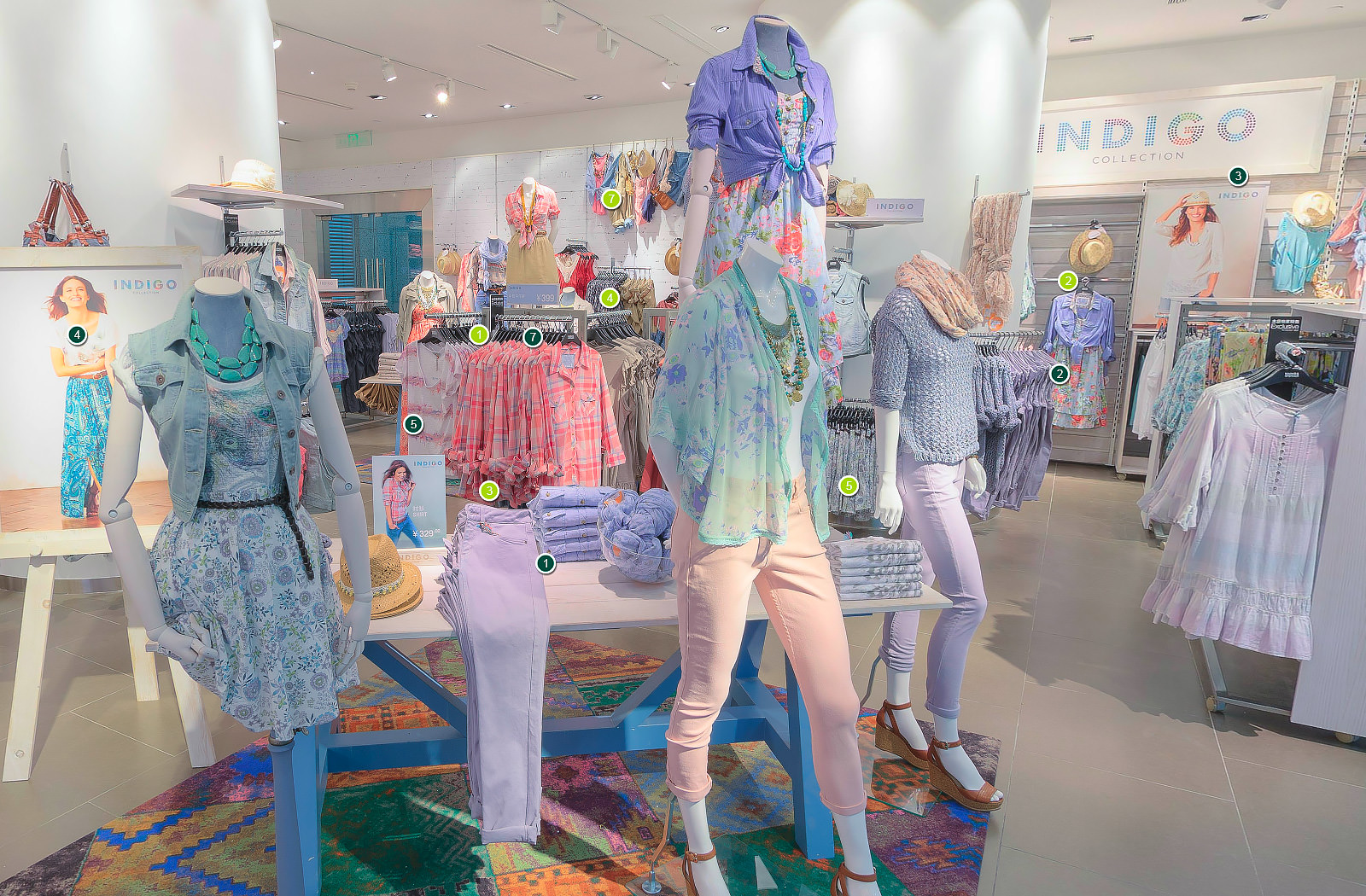
We created a visual merchandising training tool for M&S to help the brand roll out consistent VM standards across more than 480 international stores. Instead of flying teams to a flagship store and handing out printed manuals, this different approach gave every VM colleague a guided, interactive walk-through of a perfect store on their iPad.
The brief
M&S needed a practical way to show exactly how a flagship store should look and feel, then make that knowledge easy to apply locally. The tool had to be engaging, quick to use on the shop floor and simple to keep up to date.
How it works
The experience is a virtual store walk-through. VM teams move through the space and tap hundreds of info points for the detail that matters: sightlines, adjacencies, mannequin styling, ticketing, equipment, seasonal bays and care of fixtures. A custom-built CMS lets team leaders add, edit and retire guidance as ranges change, so the content stays current.
Shooting and post-production
Shooting the flagship stores was a pleasure. We scheduled the shoots for times when the stores were closed so there were no people in shot, and the shop and products would be perfect. However the lack of staff at those times also meant that we had to pitch in to ensure the VM was perfect – photographers aren’t known for their ability to tie ties well, but we think we stepped up to the occasion.
Each 360 image was carefully crafted in post-production for straight lines, clean joins and accurate colour, so what learners see on screen is what they should create in store. We completed much of the structure for the CMS in advance of the shoots, so as soon as the 360 images were ready, much of the content was already loaded and just needed to be programmed in to the precise locations within each 360. This enabled a swift turnaround.
Results
- Consistent standards at scale – every VM colleague can access the same clear guidance, not just those who visited a flagship.
- Faster onboarding and refreshers – short, visual learning beats lengthy manuals and is easy to reference during set-up.
- Lower cost and carbon with fewer flights and hotel nights. Less time away from stores. A smaller footprint.
Environmental impact
Replacing long-haul training trips with an iPad-based experience cuts emissions and waste. The tool reduced the need for air travel, hotel nights and printed manuals, helping M&S lower its training footprint while maintaining high standards across every store.
Why it matters
This is training that feels like an in-person experience. Teams see the store as customers see it, then apply that clarity to their own layouts. It shortens the path from guideline to great execution and makes it easy to keep standards high, everywhere.
FAQs
VM managers, store managers and new starters use it for onboarding, refreshers and pre-season briefings.
Yes. The CMS allows authorised users to add or amend info points, images and sections as ranges change.
It allows teams to be trained in a flagship store, without the costs and environmental impact of flying them all to the location. This can be complementary to their own, localised in-store training.
Page last updated: December 2025